
AngelSense Guardian
AngelSenseParenting
4.6473.00 Reviews
- Version
- 4.4.5
- Installs
- 100.00K
- Age Rating
- Everyone
Screenshots
Our Review of AngelSense Guardian
 Analysis by Appyee
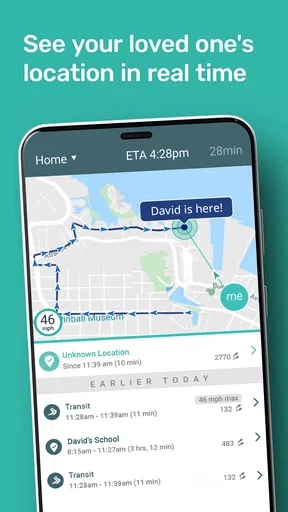
When a child or an adult with special needs needs more support outside the home, ordinary location sharing can feel too limited. AngelSense Guardian is a parenting app from AngelSense built around live location, alerts, and two-way voice communication. I see it as a safety-focused companion for families who need more context than a simple map pin can provide.
The important distinction is that this is not presented as a general social or messaging app. Its purpose is supervision: helping a guardian stay informed about where a supported person is and react when something appears unusual. That makes the app especially relevant to parents, caregivers, and families coordinating care for children or adults with special needs.
It is free to install, carries an Everyone age rating, and works on Android with a minimum operating system requirement of 12. The current version is 4.4.2. Those details make the initial barrier fairly low, although the practical value of any location service depends on the compatible equipment and setup used with it, so I would treat installation as the beginning of the decision rather than the whole decision.
How the app fits into everyday caregiving
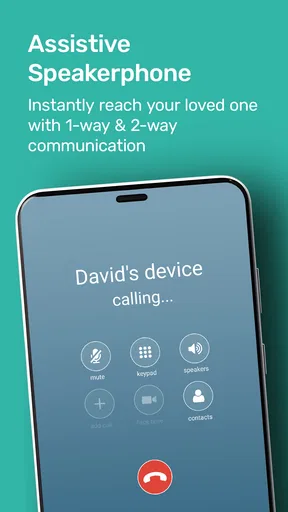
In use, I would think of AngelSense Guardian as a shared reassurance tool rather than something a child is expected to operate independently. A parent can use it to check a current location, receive alerts, and communicate through two-way voice when a normal phone call would be inconvenient or confusing.
That focus matters for people who may not reliably answer a phone, remember to charge or carry one, or explain where they are. A caregiver may need a quick way to check a route, notice a change in routine, or make contact without turning the situation into a long conversation. The app’s design goal is therefore practical and immediate: reduce uncertainty during moments when a guardian needs useful information quickly.
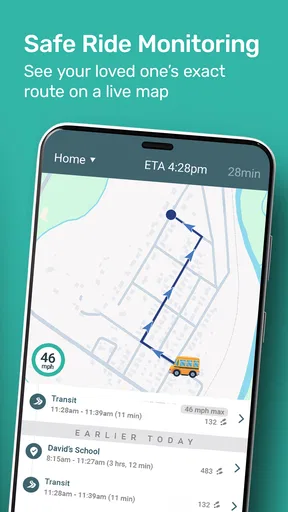
A realistic example would be a school-day pickup. A parent is working, a school transport journey is underway, and the child is expected to arrive at a familiar destination. Instead of repeatedly calling, the parent can use the app as a central place to monitor the journey and respond if an alert appears. If the child becomes separated from the expected routine, two-way voice may offer a simpler way to make contact than asking the child to navigate a conventional phone interface.
I would not treat that scenario as a replacement for supervision or emergency services. Location information can be delayed, a device can lose power or connectivity, and an alert still requires a human decision. The app is most useful when it shortens the time between noticing a concern and taking an appropriate next step.
The app also makes sense for more than one caregiver. In a family where one adult handles mornings and another handles afternoons, a shared safety workflow can reduce duplicated calls and misunderstandings. The useful habit is to agree in advance who watches for alerts, who contacts the person being supported, and who takes action if the location does not match the expected plan.
What makes its approach different
Compared with ordinary phone location sharing, AngelSense Guardian is aimed at a more care-oriented situation. A typical map-sharing tool may show where a phone is, but it does not necessarily fit a person who needs simplified communication or a guardian who wants alerts connected to a daily routine. The combination of live location, alerts, and two-way voice gives this app a narrower but more purposeful identity.
That narrow focus is also a trade-off. If everyone in the household already uses smartphones comfortably and only wants occasional location sharing, a familiar map service may be easier and less specialized. AngelSense Guardian becomes more compelling when the person being supported cannot be expected to manage a standard smartphone experience consistently.
I also appreciate that the stated audience includes adults with special needs, not only children. That broadens its usefulness for families supporting an adult who has some independence but still benefits from a guardian’s awareness. The right balance is important: the app should support autonomy, not become an excuse to monitor every ordinary movement without agreement and care.
Practical routines that make the alerts useful
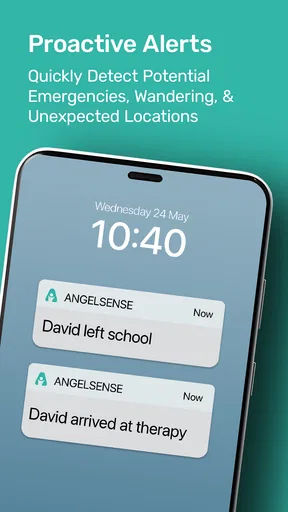
Alerts are only valuable when they help distinguish a genuine concern from normal variation. I would begin with a small number of important routines rather than trying to react to every movement. For example, a guardian might focus on departure from school, arrival at home, or an expected transport change. Keeping the workflow simple makes it easier to notice the alert that actually matters.
A second useful habit is to decide what an alert means before it arrives. If a person is late, should the guardian call first, contact a school or transport provider, or check with another caregiver? Writing that plan down for the adults involved prevents the app from creating more confusion at stressful times.
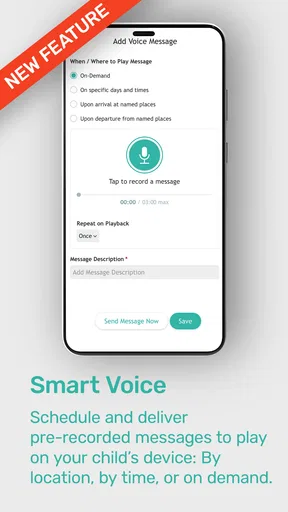
Two-way voice is most helpful when the message is short and familiar. I would use clear phrases such as “I am checking in” or “Please wait where you are,” rather than relying on the person to hold a complex conversation. This is a small but important distinction: the feature can support communication, but its success depends on whether the supported person understands the routine and feels comfortable using it.
Another non-obvious consideration is battery discipline. A location tool is only dependable when the relevant device is powered and carried as expected. I would make charging part of an existing routine, such as preparing for school the night before, and teach every caregiver to check that step. No app can compensate for a device left at home or switched off.
Families should also review who truly needs access. The app may be used by several people in a care network, but wider access is not automatically better. A smaller, clearly agreed group reduces accidental over-monitoring and makes it obvious who is responsible for responding when something happens.
Where the free installation fits into value
The app is free, which makes it reasonable to explore without treating the download itself as a financial commitment. That is useful for families who want to understand the interface and decide whether its approach fits their situation before making a larger commitment elsewhere in their safety setup.
Still, “free” should be read carefully. The app’s usefulness is tied to the broader location and communication arrangement, so I would not judge its total value only by the installation cost. Before depending on it, I would check how the required device setup works for the person being supported, whether the family can maintain it daily, and whether the complete arrangement fits the household’s needs.
This is where AngelSense Guardian needs a more thoughtful evaluation than a simple free-versus-paid comparison. A free app that is difficult for the supported person to carry, charge, or understand may deliver less real value than a familiar alternative already used reliably by the family. On the other hand, a specialized workflow can be worth more than a general tool when it prevents repeated calls and gives caregivers clearer information during a stressful moment.
The app has an average rating of 4.6 from around 900 ratings, with over 400 written reviews and more than 100 thousand installs. Those figures suggest that many people have found the product worth trying, but they do not prove that every family will have the same experience. Location accuracy, alert usefulness, and communication comfort are highly dependent on the person, environment, and routine.
Limitations I would consider before relying on it
The first limitation is emotional and practical rather than technical: monitoring can affect trust. A child or adult may feel watched, especially if caregivers check constantly instead of using the app for agreed safety purposes. I would explain what is being monitored, who can see it, and when the information will be used. That conversation is part of responsible setup, not an optional extra.
The second limitation is that alerts can create either reassurance or anxiety. If a family responds to every unexpected movement as an emergency, the app may increase stress. It works better when caregivers learn the person’s normal patterns and reserve urgent reactions for meaningful deviations.
The third is that two-way voice is not the same as a full phone conversation. It may be excellent for a quick instruction or check-in, but it is not a substitute for broader communication needs. If the person needs regular calls, text messages, video, or access to other services, a conventional phone may still be the better primary device.
I would also be cautious about assuming that live location always equals immediate certainty. Buildings, transport, connectivity, and device condition can influence what a guardian sees. The correct response to an unexpected location is to combine the app with context: the schedule, the person’s habits, and contact with relevant adults. Treating the map as infallible would be a mistake.
Finally, the minimum Android requirement of version 12 may exclude older phones. That is not a problem for a current device, but it can matter in families hoping to reuse an older handset. I would check compatibility before planning a full household rollout, particularly if several caregivers need access from different phones.
Who is most likely to benefit
I think the strongest fit is a family supporting someone who can travel or spend time away from home but needs a guardian to remain informed. The app is especially relevant when ordinary phone use is unreliable, when routines matter, or when a short voice connection is easier than typing or answering a call.
It can also help families divide responsibility. A parent may handle the morning routine while another trusted adult watches the return journey. The value is not simply seeing a dot on a map; it is creating a shared response system in which the right person can notice a concern and act.
Caregivers should skip it, or at least compare alternatives first, if their only need is occasional location sharing between capable smartphone users. In that case, a general-purpose tool may be less specialized and more familiar. I would also look elsewhere if the person being supported strongly dislikes location monitoring and there is no meaningful safety agreement around its use.
It may not be the best first choice for families seeking a complete communication platform, a general family organizer, or a replacement for emergency response. Its strength comes from a specific caregiving problem, and its value decreases when that problem is not central.
My recommendation after weighing the trade-offs
AngelSense Guardian is a focused parenting and caregiving app with a clear purpose. I like the way it brings live location, alerts, and two-way voice into one safety-oriented workflow, especially for children and adults with special needs who may not manage conventional phone tools easily.
The free installation makes it accessible to test, while the practical decision should focus on the complete setup and the family’s ability to maintain it consistently. I would install it when the household needs structured awareness and a simpler way to check in. I would skip it when basic location sharing already solves the problem or when monitoring would damage trust more than it improves safety.
My final advice is to start with one routine, one responsible caregiver, and one clear response plan. Test how the supported person reacts to the voice feature, confirm that the device is carried and charged, and judge the alerts by whether they help you make better decisions. If they do, this app can become a valuable layer of everyday reassurance. If they only add noise or encourage constant checking, a simpler alternative may serve your family better.
Privacy and Permissions
See what permissions an app requests and how it handles your data.
- Identity
- find accounts on the device
- Contacts
- find accounts on the device, read your contacts, modify your contacts
- Location
- approximate location (network-based), precise location (GPS and network-based)
- Phone
- read phone status and identity
- Photos/Media/Files
- read the contents of your USB storage, modify or delete the contents of your USB storage
- Storage
- read the contents of your USB storage, modify or delete the contents of your USB storage
- Camera
- take pictures and videos
- Microphone
- record audio
- Wi-Fi connection information
- view Wi-Fi connections
- Device ID & call information
- read phone status and identity
- Other
- view network connections, pair with Bluetooth devices, control flashlight, full network access, change your audio settings, control vibration, prevent device from sleeping
Verdict
Strengths of AngelSense Guardian
- Provides real-time location updates for added peace of mind.
- Geofencing alerts notify caregivers when someone enters or leaves places.
- SOS and assistance features can support users during urgent situations.
- Location history helps review routes and identify travel patterns.
- Designed for caregivers, with sharing options for trusted contacts.
Limitations of AngelSense Guardian
- Requires a compatible AngelSense device for full functionality.
- Ongoing subscription costs may be expensive for some families.
- Frequent location updates can reduce the tracker’s battery life.
- Indoor accuracy may vary in large buildings or areas with weak signals.
- Some users may find continuous monitoring intrusive or uncomfortable.
Similar Picks in This Category
View All
Family Space
Motorola Mobility LLC.3.9

شرطة الأطفال - مكالمة وهمية
Oub Apps4.1

Findmykids: Parental Control
LETEM LTD4.6

Pregnancy + | Tracker App
Philips Electronics UK Limited4.8

Policía de niños - para padres
Kids police4.7

Pregnancy App
Amila4.9
Frequently Asked Questions
What is AngelSense Guardian and who is it designed for?
AngelSense Guardian is a safety and location-tracking app designed primarily for families, caregivers, and support teams looking after children or adults who may need additional supervision. It can help monitor a user’s location, recognize visits to familiar places, provide alerts, and support communication during daily routines. It is especially useful for users who may wander, have difficulty communicating, or need assistance while traveling independently.
How does AngelSense Guardian track a person’s location?
The service generally works with an AngelSense wearable or compatible tracking device that uses GPS, cellular connectivity, Wi-Fi, and other location technologies to send updates to authorized caregivers. The app can display the device’s current or recent location and may provide route information, arrival notifications, and departure alerts. Accuracy can vary depending on signal strength, indoor environments, battery level, and network coverage.
Does AngelSense Guardian require a subscription or additional device?
Users should check the current plan details before downloading because AngelSense Guardian typically depends on an AngelSense tracking device and a paid service subscription rather than functioning as a complete phone-only tracker. The subscription may cover cellular connectivity, location services, alerts, and account features. Pricing, included tools, trial periods, and device requirements can differ by country and may change over time.
What safety alerts and communication features are available?
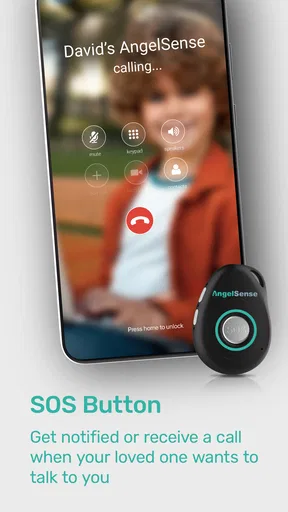
AngelSense Guardian may provide notifications for events such as leaving or arriving at saved places, unexpected movement, changes in routine, or possible wandering. Depending on the device and plan, caregivers may also have access to two-way voice communication, an SOS function, live location sharing, and other assistance tools. These features should be treated as support tools, not as a replacement for emergency services or direct supervision.
Is AngelSense Guardian suitable for privacy-conscious families?
Because the app can collect and share sensitive information such as location history, routines, device activity, and possibly voice communications, privacy should be reviewed carefully before installation. Only trusted caregivers should receive account access, and users should examine the current privacy policy, permissions, retention practices, and sharing controls. Families should also discuss consent and local legal requirements when tracking another person.
